
Connecting the Software a Trade Service Business Already Uses
How I connect booking pages, job boards or field service software, calendars, accounting and email so a booking becomes a job, a finished job becomes an invoice, and nobody retypes anything.
Colton Sims · November 18, 2026 · 5 min read

Most trade service businesses run on four or five tools that don't talk to each other. Customers book through a scheduling page, jobs live on a board or in field service software, the crew works off a calendar, invoices go out of the accounting system, and email is where everything else happens. Someone in the office copies details from one to the next, every day.
That's common. In the U.S. Chamber of Commerce's 2026 small business report, 41% of small businesses said they use six or more platforms, nearly three times the 2022 share.
I connect those tools so each hand-off happens on its own. A booking becomes a job. A finished job becomes an invoice. A payment closes the job. You keep the software you already pay for and already know.
The usual setup, and what gets retyped
| What it does | Common choices | What someone retypes |
|---|---|---|
| Online booking | Calendly, Acuity Scheduling, Square Appointments, or the booking page in your field service software | Name, address, phone and the problem, into a job |
| Jobs and dispatch | A board like Trello, Asana or monday.com, or field service software like Jobber, Housecall Pro or ServiceTitan | The date, onto the crew's schedule |
| Crew schedule | Google Calendar, Outlook, or the dispatch board in your field service software | Nothing new, but it drifts out of date when jobs move |
| Invoices and payments | QuickBooks Online, Xero or FreshBooks | The customer and line items from the finished job |
| Gmail or Outlook | Thank-you notes and review requests, when someone remembers |
None of these tools is the problem. The problem is the gaps between them, because every gap is a person doing data entry, and data entry is where details get dropped.
If you already run field service software
Jobber, Housecall Pro and ServiceTitan already cover booking, dispatch, invoicing and payments in one place. If that's you, a lot of what's below is already built in, and you should use it. The connecting work moves to the tools around it: a separate accounting system your bookkeeper prefers, a marketing email tool, a shared inbox, a spreadsheet the office still keeps for job costing, or a supplier's ordering portal. The gaps are fewer, but they're still there.
Where it breaks
- A booking never becomes a job. It's in the booking tool and someone's inbox, but nobody created the work order, so it falls off the schedule.
- A job moves and the calendar doesn't. The board says Thursday, the crew calendar still says Tuesday.
- Finished work sits uninvoiced. The job was marked complete on Friday. The invoice goes out the following week, or not at all.
- Paid jobs and unpaid jobs look the same. Someone checks the accounting system against the board by hand to see who still owes money.
- Job costing happens after the fact, if at all. Labor hours and materials live in different places, so nobody knows what a job really made until the books close.
- Review requests depend on memory. The best time to ask is right after the job, which is exactly when everyone is busy.
What the connected version does
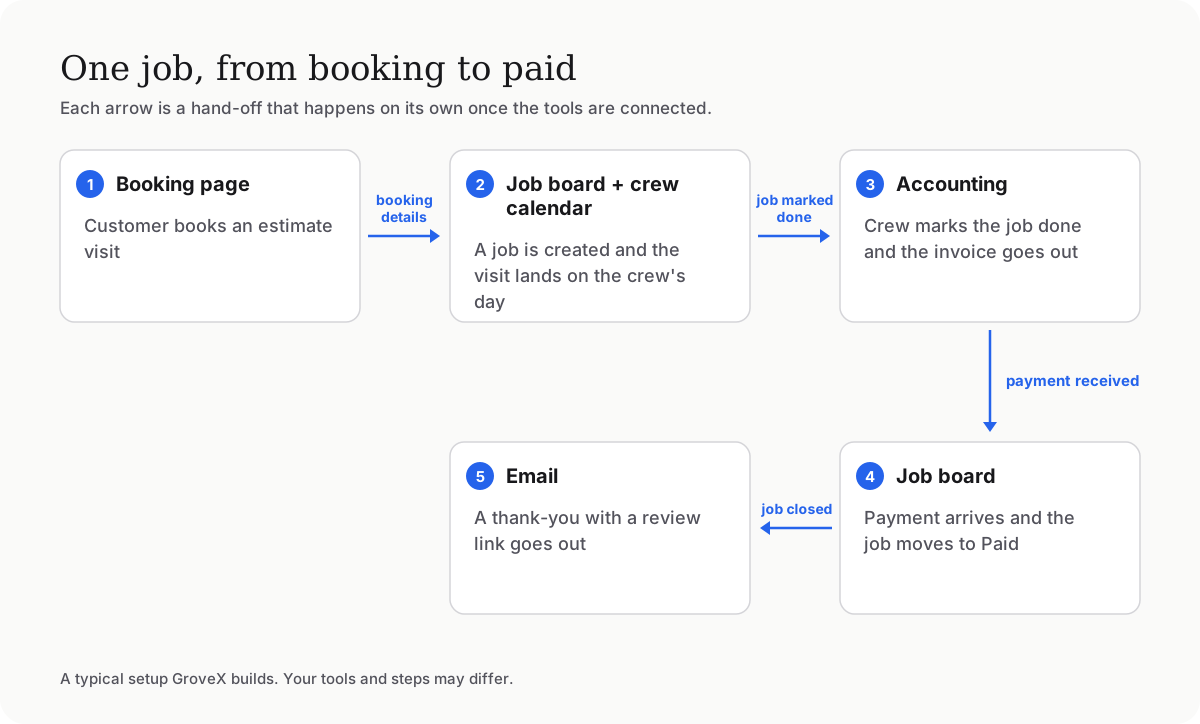
Walking through one job, using a setup with Calendly, Trello, Google Calendar, QuickBooks Online and Gmail as the example:
- A customer books in Calendly. Their name, address, phone and the answers from your booking form become a new job card in Trello, in the right list, with the visit time on it.
- The visit lands on the crew calendar at the same time. If the job's date changes later, the calendar follows.
- The crew marks the job done. That creates the invoice in QuickBooks, addressed to the right customer, with the job details on it. You can have it send straight away or wait for your approval.
- When the invoice is paid, the job moves to Paid on its own. Your board now shows who still owes you without anyone checking.
- A day after the job closes, the customer gets a short thank-you email with your Google review link.
Swap in Acuity for Calendly, Asana for Trello or Xero for QuickBooks, and the steps stay the same. Every step keeps a record, so when something looks off you can see what happened and when.
What stays manual, on purpose
Not everything should run on its own. Estimates and pricing need your judgment, so the system drafts and you decide. Disputes, refunds, warranty calls and anything a customer is upset about go to a person. I'd rather leave a step manual than automate one that needs a human.
How I build it
I start by mapping how a job actually moves through your business today, including the workarounds. Then I write it up as a short spec you approve before I build anything. The connections use each tool's official integration, not screen scraping, and I test them on real jobs with you watching before anything sends to a customer. Most owners start with approvals turned on and loosen them once they trust it.
You own the setup and the accounts. If you ever want someone else to maintain it, there's nothing to untangle.
When you don't need me
If all you want is one simple link, like "a new booking creates a job card," a tool like Zapier or Make can do that on its own and you should try it first. Where it gets harder is when the steps depend on each other, need your business rules, or have to handle the exceptions: a rescheduled visit, a job split across two days, a customer with two properties, a callback on a warranty job. That's the work I do.
Common questions
Do I have to switch software? No. The point is to connect what you already use. If one of your tools can't be connected at all, I'll tell you before we start.
We use Jobber (or Housecall Pro, or ServiceTitan). Is this still useful? Sometimes. Those cover a lot on their own. The value is usually in connecting them to the accounting, marketing or reporting tools they don't cover the way you want.
What happens if one of the tools changes? Software updates occasionally change how integrations work. I build in alerts so a broken hand-off gets noticed the same day, not at the end of the month.
Can the crew keep working the way they do now? Yes. For most crews, the only change is that marking a job done now does something.
What does it cost? One fixed price, quoted up front after a short call, for a written spec you approve before I build.