
Connecting the Software a Property Management Company Already Uses
How I connect AppFolio, Buildium, Rent Manager and the tools around them so a tenant's request becomes a work order, a vendor visit and a closed bill without anyone retyping it.
Colton Sims · November 25, 2026 · 4 min read

A property management company's day is mostly hand-offs. A tenant reports a leak, someone opens a work order, someone else emails a vendor, the vendor's visit has to reach the tenant, and the vendor's bill has to land on the right owner's statement. Each step usually lives in a different tool, and the glue between them is a person copying details.
I connect those tools so the hand-offs happen on their own, inside the software you already run. The first thing I check, though, is which property management software you're on, because that decides what's possible.
The usual setup
| What it does | Common choices |
|---|---|
| Property management software (leases, rent roll, work orders, owner statements) | AppFolio, Buildium, Rent Manager, Yardi Breeze, DoorLoop |
| Maintenance coordination | The work order tools inside your platform, or a dedicated service like Property Meld or Latchel |
| Showings and leasing | ShowMojo, Tenant Turner, or your platform's leasing tools |
| Vendor scheduling | Google Calendar or Outlook, plus texts and phone calls |
| Accounting | Trust accounting inside your platform; some companies also keep their own books in QuickBooks Online or Xero |
| Gmail or Outlook, often a shared maintenance inbox |
Check your software first
Property management platforms differ a lot in how open they are:
- Buildium includes its Open API on the Premium plan. On lower plans, connections are limited.
- Rent Manager offers an API with read and write access to your data.
- AppFolio offers its developer tools through its partner program, so what an outside builder can connect depends on your plan and AppFolio's partners.
If your platform is closed, I'll tell you before we start. Sometimes the right answer is to connect around it, through email and calendars, and sometimes it's to leave it alone.
Where it breaks
- Requests arrive everywhere. Email, texts, voicemail and the portal, so some never become work orders.
- Vendors get the job without the details. Gate codes, pet notes and the tenant's availability live in a different place than the work order.
- Tenants don't know when someone's coming. That generates calls, and calls generate more notes to copy.
- Bills sit in an inbox. The repair is done, but the vendor's invoice isn't entered until someone gets to it, so owner statements run late.
- Make-ready turns stall between steps. Move-out inspection, paint, cleaning and repairs each wait on someone noticing the last one finished, and the unit sits vacant longer than it needs to.
What the connected version does
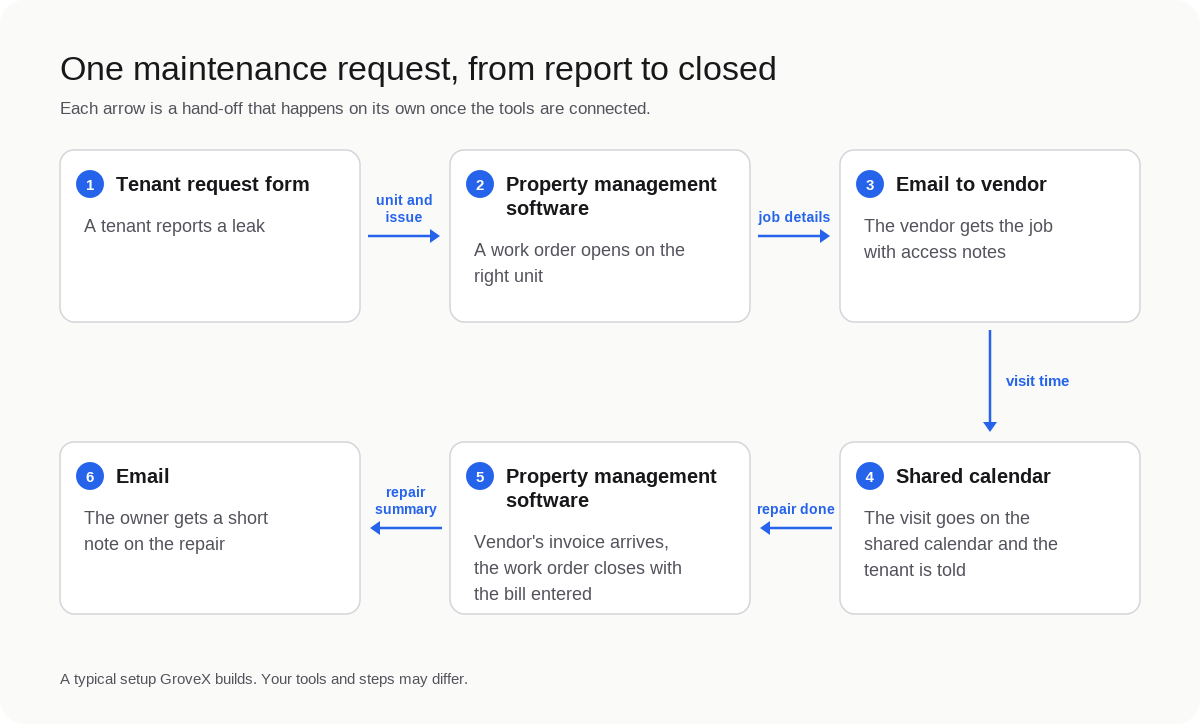
- A tenant submits a request through your form or portal, or an email to your maintenance address gets read and sorted.
- A work order opens on the right property and unit, with the tenant's description and photos attached.
- The vendor gets the job by email, with the access notes, the tenant's availability and your not-to-exceed amount, from your list of preferred vendors for that kind of repair.
- The visit goes on the calendar, and the tenant gets a message with the time. If it moves, both get the update.
- When the vendor's invoice arrives, it's matched to the work order, entered as a bill against the right property and the work order closes. Anything over the not-to-exceed amount waits for your approval, and the bill lands where your owner statements pick it up.
- The owner gets a short note on what was fixed, if that's how you work with your owners.
What stays manual, on purpose
Emergencies go to a phone call, every time. Deciding whether a repair is the owner's or the tenant's responsibility stays with you, and so does anything involving a deposit, a lease or a dispute. The system routes and records. It doesn't make those calls.
How I build it
I map how a request actually moves through your office today, including the shortcuts, and write it up as a spec you approve before I build. I connect each tool through its official integration where one exists and test with real requests before anything reaches a tenant or vendor. You own the setup and the accounts.
When you don't need me
If your software's built-in automation already covers you, use it. Many platforms have work order notifications and vendor portals of their own, and services like Property Meld or Latchel handle much of the maintenance coordination on their own. I'm useful where the steps cross several tools, follow your rules for which vendor gets which job, or have to catch the requests that come in by email and text instead of the portal.
Common questions
Do we have to switch property management software? No. If your platform can't be connected, I'll tell you up front and we'll decide together whether connecting around it is worth doing.
Can tenants and vendors keep using what they use now? Yes. Tenants still use your portal or email. Vendors still get email. The difference is what happens after the message arrives.
What about owner accounting? Bills and work orders flow into the system you already use for owner statements. I don't change how you account for owners, I just make sure the bill gets there.
What does it cost? One fixed price, quoted up front after a short call, for a written spec you approve before I build.